TencentCloud/CubeSandbox
CubeSandbox
CubeSandbox is a high-performance, open-source sandbox service built on RustVMM and KVM by Tencent Cloud. It delivers hardware-isolated MicroVM environments in under 60ms with less than 5MB of memory overhead per instance, enabling thousands of concurrent sandboxes on a single node. CubeSandbox is natively compatible with the E2B SDK — swap one environment variable to migrate from E2B Cloud without touching business logic. It ships as a multi-component service: CubeAPI (Rust/Axum REST gateway), CubeMaster (Go orchestrator), Cubelet (node-local scheduler), CubeShim (containerd Shim v2 adapter), CubeHypervisor (KVM MicroVM manager), and CubeVS (eBPF virtual switch). Tencent Cloud has validated CubeSandbox at production scale.
Showcase
Features
- E2B SDK drop-in compatibility — Replace
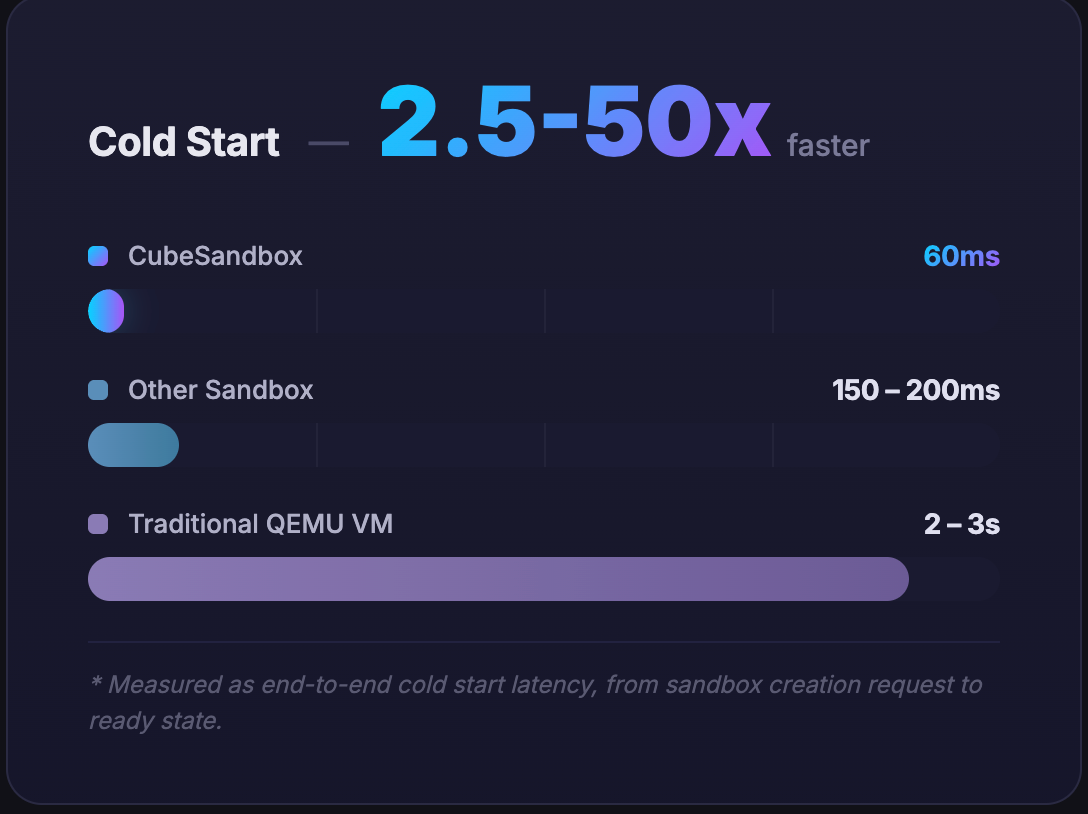
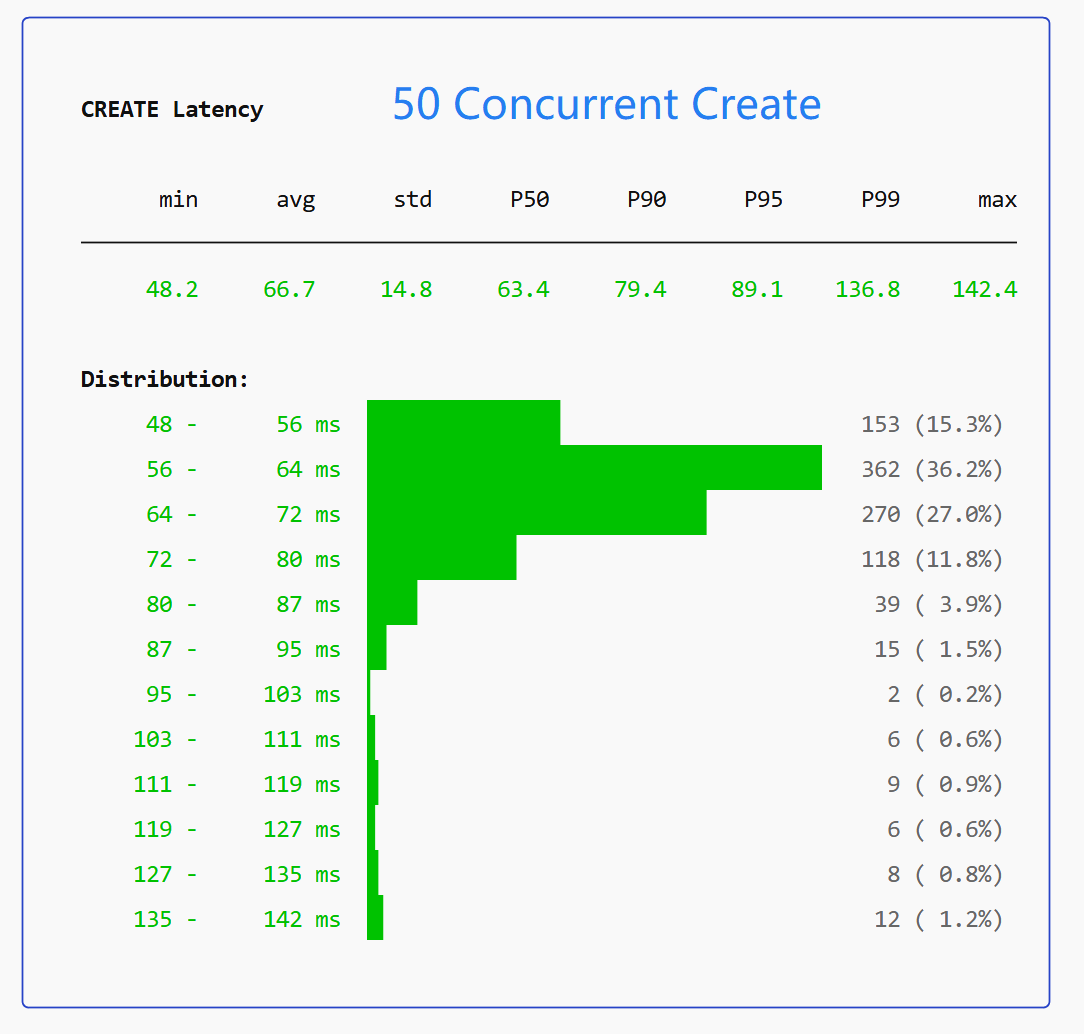
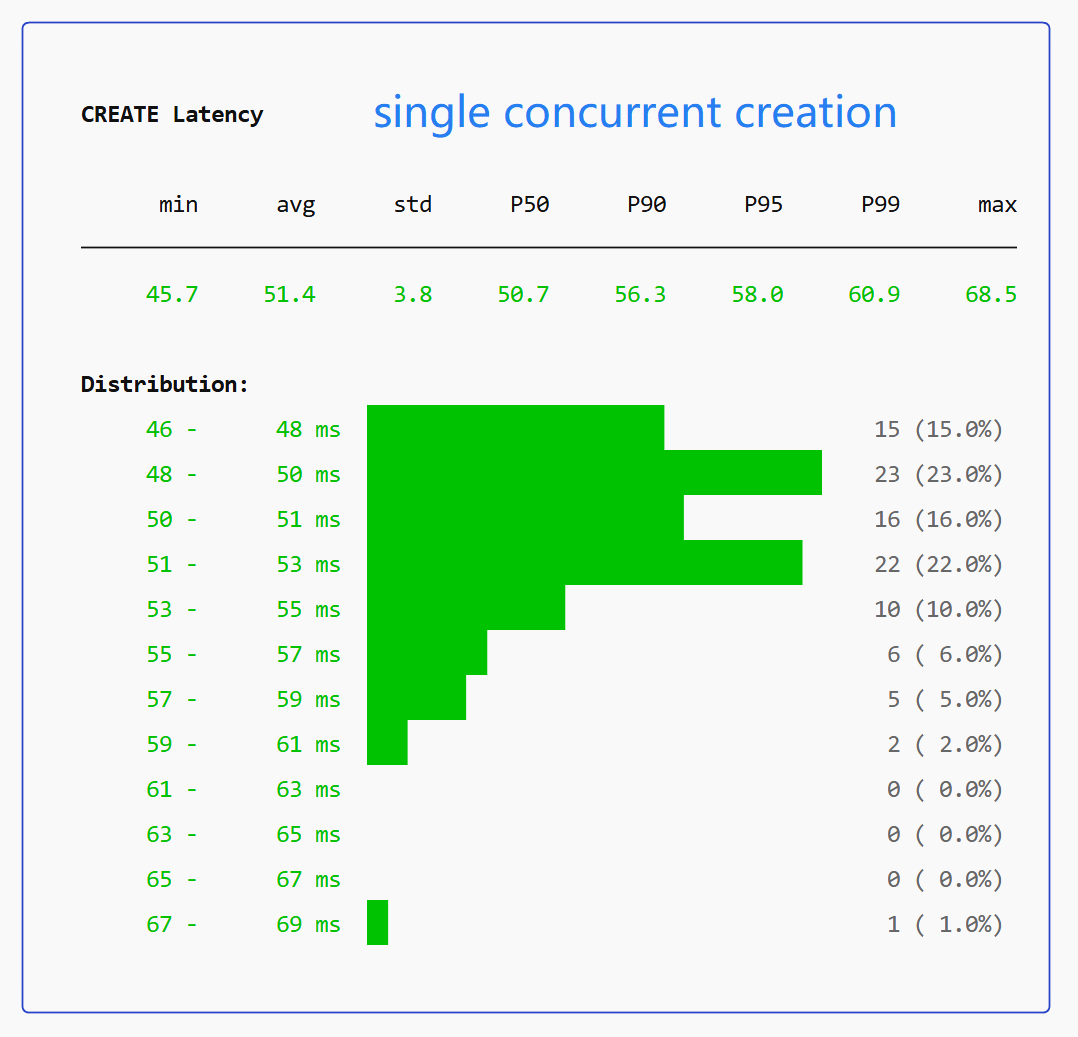
E2B_API_URLto point at CubeSandbox; no SDK or business logic changes needed. - Sub-60ms cold start — Resource pool pre-provisioning and CoW snapshot cloning skip time-consuming boot entirely. Average end-to-end < 60ms; P99 < 150ms at 50 concurrent.
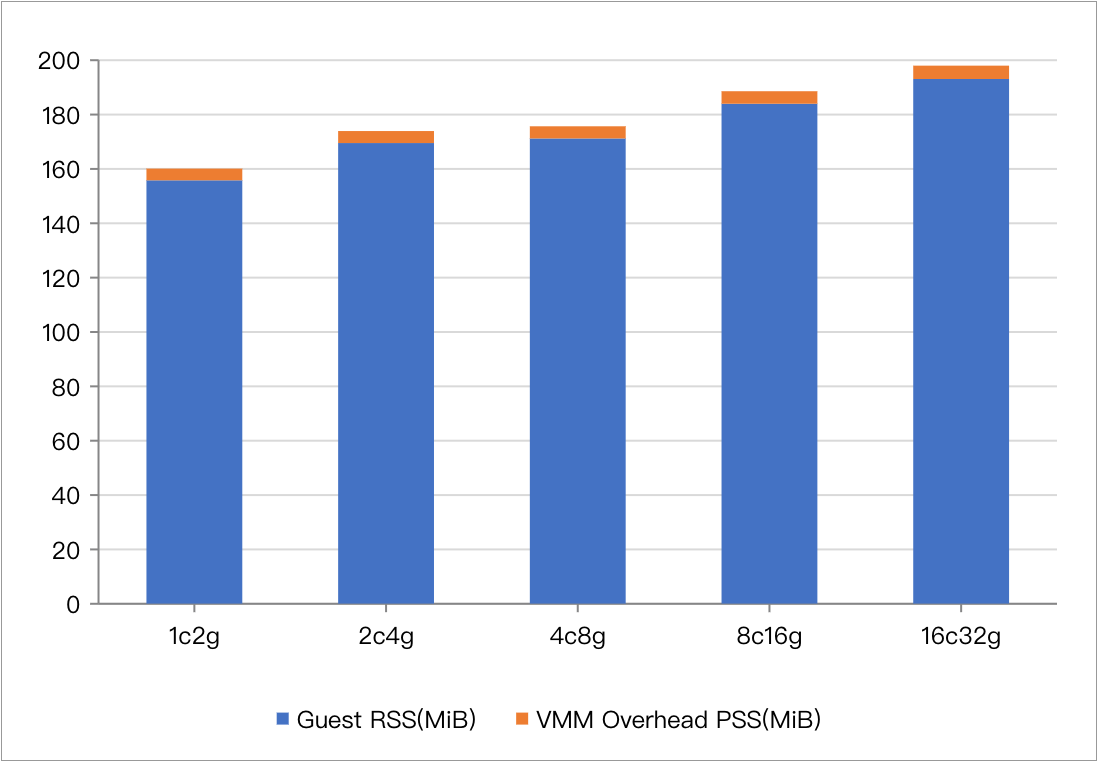
- < 5MB per-instance memory overhead — Aggressively trimmed Rust runtime + CoW page sharing enables thousands of concurrent sandboxes on one node.
- Dedicated Guest OS kernel per sandbox — Each MicroVM runs its own kernel, eliminating container escape risks from shared-kernel namespace isolation.
- CubeVS eBPF network isolation — Three eBPF programs (from_cube, from_world, from_envoy) enforce per-sandbox SNAT, DNAT, LPM-trie egress policies, and ARP proxy entirely in kernel space.
- OCI image → template pipeline — Import any container image, boot and snapshot it as a MicroVM template via
cubemastercli tpl create-from-image. - Bring-your-own-image with envd — Layer
envddaemon into any OCI image using theghcr.io/tencentcloud/cubesandbox-basebase image to satisfy the sandbox protocol. - Single-node + multi-node cluster — One-click install for single-node; add compute nodes (
install-compute.sh) that auto-register to CubeMaster via the/internal/metaAPI. - Per-sandbox egress policy — Allow/deny lists specified as CIDR ranges; enforced in eBPF before packets reach userspace. Private address ranges always denied.
- Port mapping — Expose sandbox services to external traffic via static NAT rules managed by the Go CubeVS control plane.
- Pluggable authentication — Optional auth callback URL; Cube API Server forwards credentials to your service for each request.
- Sandbox pause and resume — Pause a running sandbox and resume it later (used in OpenAI Agents SDK example).
- Headless browser automation — Run Playwright/CDP-controlled headless Chromium inside a MicroVM sandbox.
- Code interpreter — Run Python/Jupyter kernel inside a MicroVM; used with OpenAI Agents SDK for data analysis and pandas/matplotlib workloads.
- RL training workloads — SWE-bench + mini-swe-agent example demonstrates multi-agent RL training in isolated sandboxes.
- HTTPS + domain routing — CubeProxy + CoreDNS with mkcert TLS; subdomain format
<port>-<sandbox_id>.cube.app. - Production-validated — Deployed at scale in Tencent Cloud production; 4 000+ GitHub stars in 18 days.
Live examples
- Code Sandbox Quickstart — Create a sandbox, run Python code, execute shell commands, manage network policies via E2B SDK
- Browser Sandbox (Playwright) — Headless Chromium inside a MicroVM, controlled remotely via CDP
- OpenClaw Integration — AI agents executing code in isolated VM environments via OpenClaw skill
- SWE-bench with mini-swe-agent — Automate SWE-bench coding tasks in isolated sandboxes with RL training
- OpenAI Agents SDK Integration — Shell Agent with Pause/Resume; SWE-bench Django debugging with streaming + tracing
- OpenAI Agents + Code Interpreter — Data-analysis Agent with pandas/matplotlib, Jupyter-kernel Code Interpreter with cross-turn state
Documentation
- Quick Start
- Architecture Overview
- CubeVS Network Architecture
- Multi-Node Cluster Deployment
- Bring Your Own Image
- Self-Build Deployment
Quick start
# 1. (Skip on bare-metal) Boot a disposable QEMU dev VM
git clone https://github.com/tencentcloud/CubeSandbox.git
cd CubeSandbox/dev-env && ./prepare_image.sh && ./run_vm.sh
# In a second terminal: ./login.sh
# 2. One-click install inside the VM (or directly on bare-metal)
curl -sL https://github.com/tencentcloud/CubeSandbox/raw/master/deploy/one-click/online-install.sh | bash
# 3. Create a code-interpreter template from OCI image
cubemastercli tpl create-from-image \
--image ccr.ccs.tencentyun.com/ags-image/sandbox-code:latest \
--writable-layer-size 1G --expose-port 49999 --expose-port 49983 --probe 49999
# 4. Run code in an isolated MicroVM sandbox via E2B SDK
pip install e2b-code-interpreter
E2B_API_URL=http://127.0.0.1:3000 E2B_API_KEY=dummy python3 - <<'EOF'
import os
from e2b_code_interpreter import Sandbox
with Sandbox.create(template=os.environ["CUBE_TEMPLATE_ID"]) as sb:
print(sb.run_code("print('safely isolated!')"))
EOF
Tags
- Maturity
- BetaBetaActively developed but pre-1.0 — no stable release tagged yet.View all repositories tagged→
- Release pattern
- FrequentFrequentNew releases ship frequently, often multiple times per week.View all repositories tagged→
- Persona
- DevOps EngineerDevOps EngineerEngineers deploying containerized services and managing infrastructure.View all repositories tagged→Backend EngineerBackend EngineerEngineers building server-side services, APIs, and infrastructure components.View all repositories tagged→AI Platform EngineerAI Platform EngineerEngineers building infrastructure and tooling for AI agents and LLM-powered applications.View all repositories tagged→
- License Category
- PermissivePermissivePermissive open-source license (MIT, Apache 2.0, BSD) allowing use without copyleft obligations.View all repositories tagged→
- Built With
- GoGoProgramming language used for CubeMaster, Cubelet, network-agent, and CubeVS control plane.View all repositories tagged→TokioTokioRust async runtime powering the CubeAPI and CubeHypervisor async components.View all repositories tagged→GinGinGo HTTP web framework used in Cubelet for node-local API endpoints.View all repositories tagged→AxumAxumRust async web framework used for the CubeAPI REST gateway component.View all repositories tagged→gRPCgRPCRemote procedure call framework used for inter-component communication between CubeMaster and Cubelet.View all repositories tagged→RustRustSystems programming language used for CubeAPI, CubeHypervisor, and CubeShim components.View all repositories tagged→RedisRedisIn-memory data store used by CubeMaster for fast cluster coordination state.View all repositories tagged→MySQLMySQLRelational database used by CubeMaster for cluster state persistence.View all repositories tagged→containerdcontainerdContainer runtime — CubeShim implements containerd Shim v2 API to integrate MicroVMs into the container runtime.View all repositories tagged→eBPFeBPFExtended Berkeley Packet Filter — used by CubeVS to enforce network policies entirely in kernel space.View all repositories tagged→virtiofsdvirtiofsdvirtio-fs daemon — used by CubeHypervisor for host-guest filesystem sharing.View all repositories tagged→RustVMMRustVMMRust VMM (Virtual Machine Monitor) — the upstream library CubeHypervisor is built on top of.View all repositories tagged→KVMKVMLinux Kernel-based Virtual Machine — the hypervisor CubeSandbox uses for hardware-isolated MicroVMs.View all repositories tagged→
- Security Posture
- UnratedUnratedOSSF Scorecard has not yet scanned this repository — security posture is unknown.View all repositories tagged→
- Maintainer Model
- Company-backedCompany-backedDeveloped and funded by a commercial company.View all repositories tagged→
- Form Factor
- ServiceServiceDeployable backend service exposing an API, rather than a library or CLI tool.View all repositories tagged→
- Platform
- ServerServerRuns on server or bare-metal hardware, not a hosted cloud service.View all repositories tagged→
- Issue load
- Well-resourcedWell-resourcedVery low ratio of open issues to stars, indicating active issue management.View all repositories tagged→
- Use case
- Egress Network Policy for SandboxesEgress Network Policy for SandboxesWhen I need to restrict what external services an AI agent's sandbox can call, I want per-sandbox egress CIDR policies enforced in eBPF so I can comply with security requirements without per-packet userspace overhead.View all repositories tagged→Custom Sandbox TemplatesCustom Sandbox TemplatesWhen my AI agent requires a specific runtime environment (e.g. a Python version with specific libraries), I want to build a custom OCI image and convert it to a CubeSandbox template so I can boot pre-configured sandboxes in milliseconds.View all repositories tagged→Secure AI Agent Code ExecutionSecure AI Agent Code ExecutionWhen I am building an AI coding agent that runs LLM-generated code, I want a hardware-isolated sandbox so I can execute untrusted code without risking host compromise or container escape.View all repositories tagged→High-Density Concurrent SandboxesHigh-Density Concurrent SandboxesWhen I need to serve many concurrent AI agent sessions on cost-constrained hardware, I want a sandbox runtime with under 5MB per-instance overhead so I can maximize density without provisioning large fleets.View all repositories tagged→E2B Self-Hosted MigrationE2B Self-Hosted MigrationWhen my AI product's sandbox costs become prohibitive on E2B Cloud, I want a self-hosted drop-in replacement so I can migrate without changing SDK or application code.View all repositories tagged→SWE-bench Agent EvaluationSWE-bench Agent EvaluationWhen I am evaluating AI coding agents on SWE-bench, I want each task to run in a fresh isolated MicroVM so I can ensure reproducibility and prevent side-effects between benchmark runs.View all repositories tagged→Multi-Tenant Code Execution PlatformMulti-Tenant Code Execution PlatformWhen I am building a multi-tenant developer platform that needs to run user code, I want per-tenant KVM isolation with eBPF network policies so I can prevent cross-tenant data access and container escape without accepting Docker's shared-kernel risks.View all repositories tagged→RL Training in Isolated EnvironmentsRL Training in Isolated EnvironmentsWhen I am running reinforcement learning experiments that require isolated code execution environments, I want a fast-start MicroVM sandbox so I can spawn and destroy training environments at scale without cross-contamination.View all repositories tagged→OpenAI Agents Code InterpreterOpenAI Agents Code InterpreterWhen I am using OpenAI Agents SDK with code interpreter, I want to point it at a self-hosted CubeSandbox so I can control my infrastructure and costs instead of depending on a managed service.View all repositories tagged→Jupyter Kernel Secure SandboxJupyter Kernel Secure SandboxWhen my data-analysis agent executes Python with pandas and matplotlib, I want the Jupyter kernel hosted in an isolated MicroVM so I can safely run user-supplied notebook code with cross-turn state.View all repositories tagged→Browser Automation SandboxBrowser Automation SandboxWhen my AI agent needs to browse the web or automate UI tasks, I want a headless browser running inside a MicroVM sandbox so I can isolate the browser process from the host and other tenants.View all repositories tagged→
- Ecosystem
- LinuxLinuxBuilt on the Linux kernel; uses Linux subsystems and tooling.View all repositories tagged→PythonPythonBuilt with the Python language.View all repositories tagged→DockerDockerRuns and manages Docker container workloads.View all repositories tagged→
- Stack
- Docker ComposeDocker ComposeLocal development and runtime are orchestrated with docker-compose.View all repositories tagged→
- Status
- ActiveActiveReceives recent commits and releases, issues are being addressed.View all repositories tagged→
- Features
- Agent SandboxAgent SandboxRun agent tool execution inside isolated Docker containers for a hard security boundary around untrusted code.View all repositories tagged→Virtual Machine HostVirtual Machine HostBuilt-in KVM-based VM manager with one-click Windows and Linux install.View all repositories tagged→eBPF Network IsolationeBPF Network IsolationCubeVS enforces per-sandbox network policies and NAT entirely in kernel space using three eBPF programs.View all repositories tagged→KVM MicroVM IsolationKVM MicroVM IsolationEach sandbox runs in its own KVM MicroVM with a dedicated Guest OS kernel, preventing container escape.View all repositories tagged→Multi-agent routingMulti-agent routingRoute channels, groups, or senders to different isolated agents each with their own workspace, model, and tools.View all repositories tagged→Pluggable Auth CallbackPluggable Auth CallbackOptional authentication via a configurable HTTP callback URL; Cube API forwards credentials to your service.View all repositories tagged→Multi-Node ClusterMulti-Node ClusterScale beyond a single machine by adding compute nodes that auto-register to CubeMaster.View all repositories tagged→Sub-60ms Cold StartSub-60ms Cold StartAverage end-to-end sandbox cold start under 60ms via resource pool pre-provisioning and CoW snapshot cloning.View all repositories tagged→OCI Image Template PipelineOCI Image Template PipelineConvert any OCI container image into a sandbox template via a 3-phase build pipeline (init → boot+snapshot → register).View all repositories tagged→Sandbox Pause and ResumeSandbox Pause and ResumePause a running sandbox and resume it later, preserving all in-memory state.View all repositories tagged→E2B SDK CompatibilityE2B SDK CompatibilityDrop-in compatible with the E2B sandbox protocol — swap one URL to migrate without code changes.View all repositories tagged→Headless Browser in VMHeadless Browser in VMRun headless Chromium inside a MicroVM sandbox and control it remotely via Playwright/CDP.View all repositories tagged→
- License
- Apache 2.0Apache 2.0Apache License 2.0 — permissive license with patent grant and attribution requirement.View all repositories tagged→
Documentation
18 pages indexed · 1,649 words▶READMECubeSandbox — READMEgithub.com/TencentCloud/CubeSandbox/blob/master/README.md↗
Cube Sandbox is a high-performance, out-of-the-box secure sandbox service built on RustVMM and KVM. It supports both single-node deployment and can be easily scaled to a multi-node cluster. It is compatible with the E2B SDK, capable of creating a hardware-isolated sandbox environment with full service capabilities in under 60ms, while maintaining less than 5MB memory overhead.
Core Highlights:
- Blazing-fast cold start (<60ms average, <150ms P99 at 50 concurrent)
- High-density deployment: <5MB per-instance memory overhead via CoW + stripped runtime
- True kernel-level isolation: each Agent runs with its own dedicated Guest OS kernel — eliminates container escape risks
- Zero-cost migration: E2B SDK drop-in replacement, swap one URL environment variable
- Network security: CubeVS eBPF-based inter-sandbox network isolation with egress filtering
- Ready to use: one-click deployment, single-node and multi-node cluster
- Production-validated: deployed at scale in Tencent Cloud environments
Benchmarks vs alternatives:
Metric Docker Traditional VM CubeSandbox Isolation Low (Shared Kernel Namespaces) High Extreme (Dedicated Kernel + eBPF) Boot Speed 200ms Seconds <60ms Memory Overhead Shared Kernel High (Full OS) <5MB E2B SDK Compatible No No Yes (Drop-in) ▶Introductiongithub.com/TencentCloud/CubeSandbox/blob/master/docs/guide/introduction.md↗
Cube Sandbox is a production-grade, multi-component security sandbox system designed for serverless computing and secure code execution environments. It implements a VM-based container isolation architecture using KVM hypervisor technology.
Key Advantages:
- Exceptional Performance: under 100ms delivery even at 100 concurrent sandboxes, <5MB memory overhead
- Secure by Design: hardware-level isolation + comprehensive network security policies in multi-tenant environments
- Ready Out of the Box: minimal deployment script, runs locally in minutes
- E2B Compatible: drop-in compatible with the E2B sandbox protocol — existing Agent applications gain stronger security without code changes
▶Quick Startgithub.com/TencentCloud/CubeSandbox/blob/master/docs/guide/quickstart.md↗
Get a fully functional Cube Sandbox running in four steps — no source build required.
Prerequisites: WSL 2 on Windows, x86_64 Linux physical machine, Linux VM with nested virtualization, or bare-metal Linux server. KVM must be available (/dev/kvm).
Step 1: Boot a disposable QEMU VM (skip on bare-metal):
git clone https://github.com/tencentcloud/CubeSandbox.git cd CubeSandbox/dev-env && ./prepare_image.sh && ./run_vm.sh # in a second terminal: ./login.shStep 2: One-click install:
curl -sL https://github.com/tencentcloud/CubeSandbox/raw/master/deploy/one-click/online-install.sh | bashInstalls: E2B-compatible REST API on port 3000, CubeMaster, Cubelet, network-agent, CubeShim, MySQL+Redis via Docker Compose, CubeProxy with TLS + CoreDNS.
Step 3: Create template from OCI image:
cubemastercli tpl create-from-image --image ccr.ccs.tencentyun.com/ags-image/sandbox-code:latest --writable-layer-size 1G --expose-port 49999 --expose-port 49983 --probe 49999Step 4: Run code in isolated sandbox using E2B SDK:
from e2b_code_interpreter import Sandbox with Sandbox.create(template=os.environ["CUBE_TEMPLATE_ID"]) as sandbox: result = sandbox.run_code("print('Hello from Cube Sandbox, safely isolated!')")▶Architecture Overviewgithub.com/TencentCloud/CubeSandbox/blob/master/docs/architecture/overview.md↗
Cube Sandbox follows a clear layered architecture. Key components:
- CubeAPI: E2B-compatible REST API gateway (Rust/Axum). Switch from E2B Cloud to Cube Sandbox by replacing environment variables.
- CubeMaster: Orchestration scheduler (Go). Receives E2B API requests and dispatches to Cubelets, handling resource scheduling and cluster state.
- CubeProxy: Reverse proxy and request routing. Parses
- . in Host header to forward SDK requests to sandbox. - Cubelet: Node-local scheduling (Go). Manages full lifecycle of all sandbox instances on a single node.
- CubeVS: eBPF-based kernel-level packet forwarding, comprehensive network isolation and security policy enforcement.
- CubeHypervisor & CubeShim: Virtualization layer. CubeHypervisor manages KVM MicroVMs; CubeShim implements containerd Shim v2 API to integrate sandboxes into the container runtime.
▶Network (CubeVS)github.com/TencentCloud/CubeSandbox/blob/master/docs/architecture/network.md↗
CubeVS is a purpose-built network virtualization layer for CubeSandbox composed of three eBPF programs, shared BPF maps, and a Go control-plane library.
Design goals:
- Point-to-point low latency: each sandbox communicates through a dedicated TAP device; no shared bridge
- Kernel-space policy enforcement: network policies evaluated in eBPF before any packet reaches userspace
- Scalable NAT: SNAT port allocation using lock-protected pool, avoiding iptables rule explosion
Three BPF programs:
- from_cube (mvmtap.bpf.c): TC ingress on each TAP device — SNAT, policy check, session creation, ARP proxy
- from_world (nodenic.bpf.c): TC ingress on host NIC — reverse NAT, port-mapping proxy
- from_envoy (localgw.bpf.c): TC egress on cube-dev — DNAT overlay traffic to sandbox IP
Network policy enforcement: per-sandbox LPM (Longest Prefix Match) tries for CIDR-based allow/deny rules. Always-denied: 10.0.0.0/8, 127.0.0.0/8, 169.254.0.0/16, 172.16.0.0/12, 192.168.0.0/16.
Port mapping: static NAT rule for inbound connections to services exposed by sandboxes. Go API: AddPortMapping, DelPortMapping, ListPortMapping, GetPortMapping.
▶Templates Overviewgithub.com/TencentCloud/CubeSandbox/blob/master/docs/guide/templates.md↗
A Template is the base image and configuration snapshot used to create Cube-Sandbox instances. Template Lifecycle:
- Init: Build rootfs using Buildkit from a base OCI image + Dockerfile
- Boot & Snapshot: Cold-boot the rootfs inside a MicroVM, wait for language environment to load, take memory snapshot
- Deploy: Register rootfs + Snapshot into the system as an available Template enabling hot-start in tens-of-milliseconds
Templates enable the sub-60ms cold start time: the snapshot cloning avoids time-consuming initialization entirely.
▶Creating Templates from OCI Imagesgithub.com/TencentCloud/CubeSandbox/blob/master/docs/guide/tutorials/template-from-image.md↗
Create, monitor, and delete Cube-Sandbox templates from any standard OCI container image using cubemastercli.
A template is a pre-built, immutable rootfs snapshot. Pipeline: OCI Image → ext4 rootfs → Snapshot → Template READY.
CLI commands: cubemastercli tpl create-from-image --image
--writable-layer-size 1G --expose-port --probe cubemastercli tpl watch --job-id cubemastercli tpl list cubemastercli tpl delete --template-id The template must expose an HTTP health probe endpoint. Cube probes the container after boot to mark it READY.
▶Bring Your Own Image (envd)github.com/TencentCloud/CubeSandbox/blob/master/docs/guide/tutorials/bring-your-own-image.md↗
Use your own application/container image as a Cube-Sandbox template. Requirements: image must include envd daemon listening on :49983.
Fastest path: build FROM ghcr.io/tencentcloud/cubesandbox-base:2026.16 (Ubuntu 22.04 + envd preinstalled).
Alternative: inject envd from cubesandbox-base into an existing image:
COPY --from=ghcr.io/tencentcloud/cubesandbox-base:2026.16 /usr/bin/envd /usr/bin/envd COPY --from=ghcr.io/tencentcloud/cubesandbox-base:2026.16 /usr/local/bin/cube-entrypoint.sh /usr/local/bin/cube-entrypoint.shenvd capabilities: Template readiness probe (GET :49983/health), Sandbox.commands.run() (POST :49983/process), Sandbox.files.read/write() (POST :49983/files), Sandbox init (POST :49983/init).
▶Examplesgithub.com/TencentCloud/CubeSandbox/blob/master/docs/guide/tutorials/examples.md↗
Hands-on examples demonstrating various Cube Sandbox use cases:
- Code Sandbox Quickstart: create a sandbox, run Python code, shell commands, manage network policies via E2B SDK
- Browser Sandbox (Playwright): run headless Chromium inside a MicroVM, control remotely via CDP
- OpenClaw Integration: deploy Cube Sandbox + configure OpenClaw skill for AI agents to execute code in isolated VM environments
- SWE-bench with mini-swe-agent: automate SWE-bench coding tasks in isolated sandboxes, multi-model support and RL training vision
- OpenAI Agents SDK Integration: wire OpenAI Agents SDK E2BSandboxClient to Cube Sandbox; Shell Agent with Pause/Resume; SWE-bench Django debugging agent with streaming + tracing
- OpenAI Agents + Code Interpreter: data-analysis Agent running pandas/matplotlib inside Cube Sandbox, Jupyter-kernel Code Interpreter with cross-turn state and auto image capture
▶Multi-Node Cluster Deploymentgithub.com/TencentCloud/CubeSandbox/blob/master/docs/guide/multi-node-deploy.md↗
Expand a single-node Cube Sandbox deployment into a multi-node cluster by adding compute nodes.
Architecture: Control Node (CubeMaster + CubeAPI + CubeProxy + CoreDNS + MySQL + Redis + Cubelet + network-agent) + N Compute Nodes (Cubelet + network-agent each).
Add a compute node:
ONE_CLICK_DEPLOY_ROLE=compute CUBE_SANDBOX_NODE_IP=<node-ip> ONE_CLICK_CONTROL_PLANE_IP=<control-ip> sudo ./install-compute.shCompute nodes auto-register to CubeMaster via /internal/meta API. No shared bridge — each sandbox has its own network isolation via CubeVS eBPF.
▶Authenticationgithub.com/TencentCloud/CubeSandbox/blob/master/docs/guide/authentication.md↗
By default, Cube API Server allows all requests without authentication. Enable with --auth-callback-url flag. When configured, every incoming request is validated by forwarding the credential header to your callback service.
Supported credential formats: Authorization: Bearer
and X-API-Key header. The E2B SDK passes E2B_API_KEY as Authorization: Bearer. Callback contract: Cube API Server POSTs to your callback URL with credential headers. HTTP 200 → allow, non-200 → 401 Unauthorized.
▶Self-Build Deploymentgithub.com/TencentCloud/CubeSandbox/blob/master/docs/guide/self-build-deploy.md↗
Build Cube Sandbox from source and deploy on a single bare-metal server. Hardware requirements: physical/bare-metal x86_64 server, KVM enabled (/dev/kvm), 8+ CPU cores, 16+ GB RAM.
Software stack installed: E2B-compatible REST API (port 3000), CubeMaster, Cubelet, network-agent, CubeShim as host processes, MySQL + Redis via Docker Compose, CubeProxy with TLS (mkcert) + CoreDNS for cube.app domain routing.
Components built from source: CubeAPI (Rust/Axum), CubeMaster (Go/Gin/GORM), Cubelet (Go/gRPC), CubeShim (Rust/containerd-shim-v2), CubeHypervisor (Rust/RustVMM), network-agent (Go/cilium-eBPF).
▶Development Environment (QEMU VM)github.com/TencentCloud/CubeSandbox/blob/master/docs/guide/dev-environment.md↗
Run Cube Sandbox in a disposable QEMU/KVM VM for development without a bare-metal server. Uses OpenCloudOS 9 as the guest OS.
Scripts: prepare_image.sh (one-off: download and init runtime image), run_vm.sh (boot VM), login.sh (SSH into VM as root).
Requirements on host: qemu, qemu-img, ripgrep. The VM uses nested virtualization — works on WSL 2 (Windows 11 22H2+), VMware with VT-x passthrough, or bare-metal.
Purpose: isolate Cube Sandbox installation from host so the host stays clean. All subsequent installation happens inside this disposable VM.
▶Template Inspection and Request Previewgithub.com/TencentCloud/CubeSandbox/blob/master/docs/guide/template-inspection-and-preview.md↗
Inspect template build status and preview the effective API request before creating sandboxes.
cubemastercli commands for template management:
- tpl create-from-image: create template from OCI image (async)
- tpl watch: monitor build progress by job ID
- tpl list: list all templates with status (BUILDING, READY, FAILED)
- tpl inspect: view template configuration and probe settings
- tpl preview: preview the effective sandbox creation request for a template
▶HTTPS & Domain Resolutiongithub.com/TencentCloud/CubeSandbox/blob/master/docs/guide/https-and-domain.md↗
Cube Sandbox uses CubeProxy + CoreDNS for TLS and domain routing. The installer bundles mkcert for local CA generation.
Domain format:
- .cube.app — CubeProxy parses the subdomain to route SDK requests to the correct sandbox instance. For production deployments, replace the mkcert CA with your organization's CA or a public CA. HTTPS is required for the E2B SDK when using Bearer token authentication.
▶Connect to an Existing Cube Clustergithub.com/TencentCloud/CubeSandbox/blob/master/docs/guide/connect/existing/cluster.md↗
Connect to an already-running Cube Sandbox cluster rather than deploying a fresh one.
Set environment variables to point at the existing cluster: export CUBEMASTER_ADDR=
:8089 export E2B_API_URL=http:// :3000 export E2B_API_KEY= Then create templates and run sandboxes as normal. Useful for shared team environments or Tencent Cloud hosted Cube Sandbox endpoints.
▶CubeSandbox Design Languagegithub.com/TencentCloud/CubeSandbox/blob/master/docs/design-language.md↗
Cube Console design system for the CubeSandbox management UI. Target audience: AI agent developers, platform operators, SREs.
Design principles: Millisecond-Native (every metric in monospace, live stopwatch on sandbox creation), Glass & Grid (deep black/midnight-blue with frosted-glass layers, CRT scanline accents), Operator-First (keyboard-driveable, high density, dark-mode only).
Color tokens: bg-0 #070B10 (page), primary #5B8DEF (CTAs), accent-cyan #22D3EE (running/live), accent-violet #A78BFA (templates/snapshots), accent-amber #F59E0B (paused).
Status states: Running (breathing pulse 1.6s), Creating (rotating stroke), Paused (static), Error (shake). All meet WCAG AA contrast.
▶Documentation Indexgithub.com/TencentCloud/CubeSandbox/blob/master/docs/index.md↗
CubeSandbox documentation home. Sections: Guide (Introduction, Quick Start, Self-Build Deployment, Multi-Node Cluster Deployment, Templates, HTTPS & Domain, Authentication, Development Environment), Architecture (Overview, Network/CubeVS), Tutorials (Examples, Creating Templates from OCI Images, Bring Your Own Image).